

Is virtual case management the solution modern law firms need to stay organized, reduce stress, and increase billable hours?
For attorneys juggling deadlines, client communications, and piles of documents, admin overload is real—and it’s costly. Virtual case management (VCM) offers a smarter, scalable way to work. By combining cloud-based tools, automated workflows, and expert virtual case managers, your law firm can:
- Save 10–15 hours per week on administrative tasks.
- Reduce stress from missed deadlines or lost files.
- Scale your practice without adding full-time overhead.
- Improve client satisfaction through faster, clearer communication.
Whether you’re a solo practitioner or manage a small team, virtual case management supports growth through flexible staffing, allowing you to scale support up or down as your workload changes—without long-term hiring commitments.
Book a free consultation with Wyzer Staffing today and see how a virtual case manager can streamline your law practice.
What Is Virtual Case Management?
Virtual Case Management is a modern approach to managing your legal practice. Instead of relying on paper files or disconnected systems, everything happens online.
Key features include:
- Cloud-based case organization: Access files, deadlines, and client updates from anywhere.
- Automated workflows and reminders: Prevent missed deadlines or overlooked tasks.
- Remote collaboration: Teams can update tasks, share notes, and communicate without confusion.
With VCM, you gain structure, visibility, and efficiency—letting you spend more time practicing law and less time managing logistics.

Why Are Virtual Case Managers Essential for Law Firms?
Virtual case managers bring human expertise to digital tools. They are trained to:
- Track deadlines and court filings
- Organize documents and case notes.
- Manage client communications
- Coordinate with your team to ensure workflows run smoothly.
Example: One small family law firm reported saving 10–15 hours per week after adding a virtual case manager to coordinate client intake, deadlines, and document preparation.
What Tools Do Case Managers Use in Virtual Case Management?
Effective virtual case management combines skilled professionals with the right software and tools. Below are the most important categories of tools and how they help your law firm stay organized, efficient, and stress-free.
Case Management Software
Case management software centralizes your practice on a single, easy-to-access platform. It allows virtual case managers to track tasks, deadlines, and client communications in real time.
Popular Options:
- Clio – Comprehensive billing, task automation, time tracking, and document management.
- MyCase – Secure client portal with case tracking and messaging tools.
- PracticePanther – Customizable workflows, automated reminders, and integration with calendars.
Benefits:
- Streamlines remote case management.
- Reduces manual administrative work for case managers.
- Improves collaboration among your team, even with virtual staff.
Virtual Legal Assistants
Virtual legal assistants complement software by handling human-driven tasks that software alone cannot.
Typical Responsibilities:
- Client intake and initial screening.
- Drafting standard legal documents.
- Scheduling appointments and follow-ups.
- Coordinating with in-house attorneys on deadlines and priorities.
Benefits:
- Frees attorneys from repetitive admin work.
- Makes scaling your practice easier without hiring full-time staff.
- Supports case managers in keeping client workflows on track.
Learn how a Wyzer Staffing virtual case manager can take 10+ hours of admin off your week.
Cloud-Based Document Management
Choosing the best document management system for law firms is essential for secure, organized, and compliant virtual case management. These systems allow virtual case managers to store, share, and retrieve files efficiently.
Common solutions include:
- Google Drive & OneDrive – Easy-to-use cloud storage with sharing and access controls.
- NetDocuments – Designed for law firms, with advanced security and compliance features.
Benefits:
- Access case files from anywhere for remote case management.
- Reduces the risk of lost or misplaced documents.
- Simplifies collaboration between attorneys, clients, and virtual staff.
Time Tracking and Billing Tools
Tracking billable hours and managing invoices is crucial. Many VCM platforms include integrated billing tools that let attorneys focus on legal work instead of chasing payments.
Benefits:
- Automatically converts tracked time into invoices.
- Accepts online payments securely.
- Helps virtual case managers ensure no billable hours are missed.
Client Communication Tools
Effective client communication builds trust and reduces unnecessary back-and-forth. Virtual case managers rely on these tools to maintain transparency and efficiency.
Features:
- Secure client portals for messaging and document sharing.
- Automated reminders for appointments, deadlines, and payments
- Two-way messaging to answer client questions quickly.
Benefits:
- Improves client satisfaction and retention.
- Keeps your team and clients aligned.
- Reduces email overload and miscommunication.
According to Clio, solo attorneys using basic case management tools may spend around $40–$100 per user per month, while small firms with multiple users and advanced features could budget $300–$1,500 per month for a full suite of tools. Annual subscriptions often come with a 15–25% discount compared to month-to-month billing.
Many platforms bundle billing, document storage, time tracking, and client portal access into a single plan, helping your firm save money while streamlining workflows.

What Are The Benefits Of Virtual Case Management For Your Practice?
1. Eliminate Time-Consuming Tasks
Let’s be real—you didn’t become a lawyer to chase paperwork or update spreadsheets. Virtual case management handles those tasks so you can focus on actual lawyering.
2. Reduce Overhead Costs
One of the most effective ways to Lower Overhead Costs at Your Firm is to replace fixed in-house roles with virtual support and cloud-based systems.
3. Enhance Collaboration Without Hiring a Full Team
You don’t need a big team to stay organized. A virtual assistant, combined with cloud-based tools, lets you assign tasks, share updates, and keep everything running smoothly.
4. Improve Client Experience
Clients want quick updates and clear answers. Virtual case tools help you respond faster, stay organized, and build trust that leads to more referrals.
5. Gain More Control Over Your Work-Life Balance
Late nights and weekend work shouldn’t be your norm. With streamlined workflows and remote case management, you get time back—so you can enjoy dinner, sleep, and life outside your firm.
How Can You Implement Virtual Case Management Successfully?
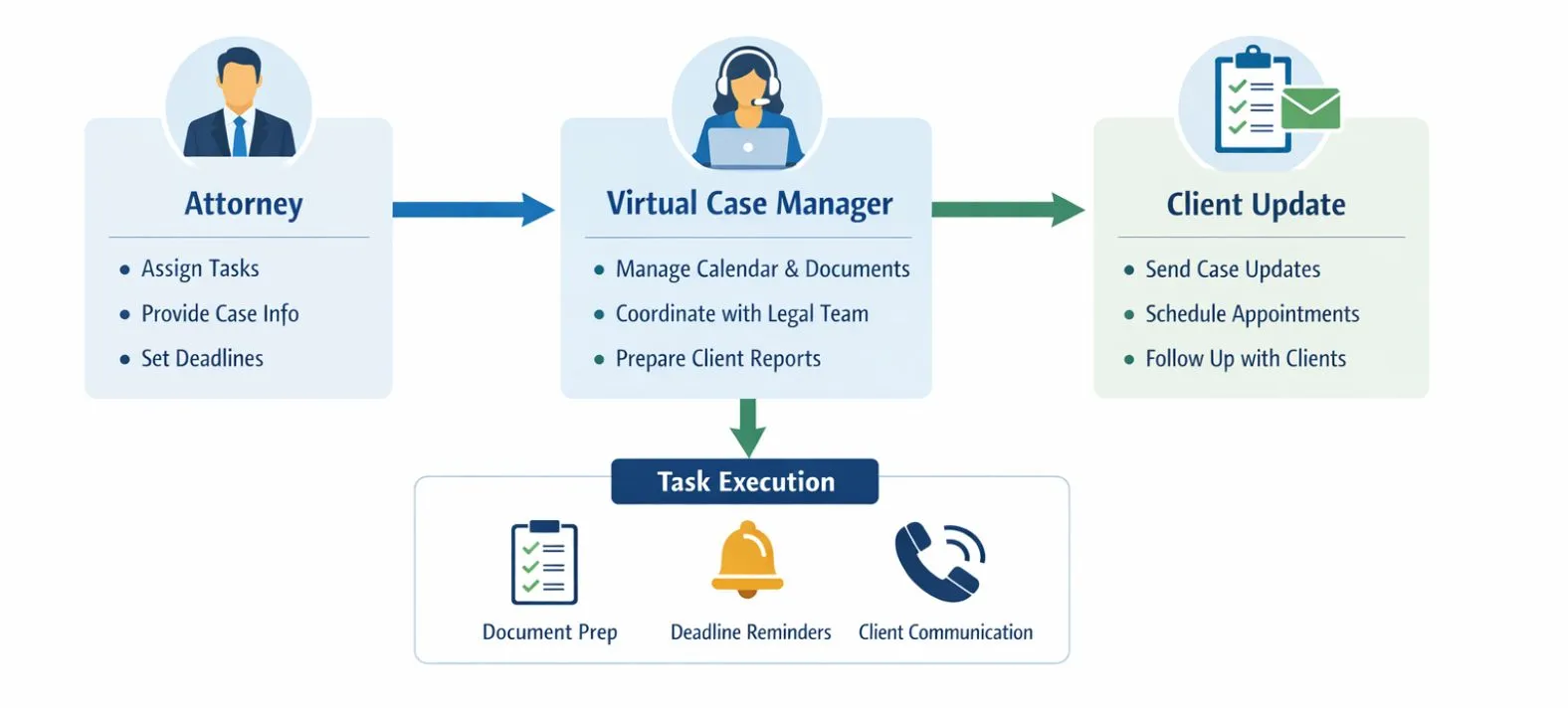
Here’s a visual representation of how tasks flow from the attorney to a virtual case manager and finally to client updates, illustrating a streamlined virtual case management process:
What Are Some Of The Issues And Advantages Of Online Or Virtual Case Management Software?
Virtual Case Management tools offer significant benefits, but they aren’t perfect. Here’s a quick breakdown of what works well and what to watch out for, along with some tips to mitigate potential issues.
Advantages
1. Work From Anywhere
You can access your files, cases, and calendar from home, court, or your phone. That means more flexibility —and more access to virtual case management jobs.
Real-Time Updates: You see changes instantly. Whether it’s a client message or a deadline adjustment, everyone on your team stays in sync—no lag, no confusion.
2. Organized Workflows
Tasks, documents, and deadlines are in one place. No more sticky notes or forgotten follow-ups. Everything runs smoothly, and you stress less.
3. Increased Efficiency: Automation handles time tracking, invoicing, and reminders. You free up hours and focus on what matters: building strong cases.
4. Cost Savings
You save money on printing, storage, and in-house admin help. For solo attorneys or small teams, that’s a huge win.
Issues To Watch Out For
1. Data Security Risks: Your data is in the cloud. If the software lacks strong encryption or compliance tools, you risk client confidentiality or legal exposure. According to LG Networks, to mitigate this risk, choose platforms that meet certified security standards and consider additional layers of encryption.
2. Internet Dependence
If your internet goes down, so does access to your cases. Always have a backup plan or offline storage for the key file to ensure continuity.
3. Learning Curve
Some platforms are easy; others, not so much. You may need training or time to fully adjust to a new system. Invest in training resources or tutorials to help your team acclimate faster.
4. Subscription Costs
Most tools charge monthly. While they save time, those fees add up. It’s important to choose a system that fits your budget and offers flexibility in subscription tiers.
5. Integration Glitches
If your software doesn’t sync with your email, calendar, or billing tools, it creates more work—not less. Test integrations before fully committing to ensure seamless operations.
Why Wyzer Staffing Is The Best Choice For You?
When it comes to modern law firm staffing, virtual case management works best when supported by experienced professionals.
At Wyzer Staffing, we provide:
- Experienced legal professionals trained to support small firms.
- Flexible, affordable plans with no long-term contracts
- US-based support familiar with your time zone and practice needs
- Seamless onboarding and workflow integration
Whether you need a virtual case manager, legal assistant, or help with document organization and scheduling, we make your firm run more smoothly without burnout.
Not sure how many virtual staff your firm really needs? Use our Staffing Calculator to find the ideal support level for your practice.

FAQs About Virtual Case Management
2. What Tasks Can A Virtual Case Manager Handle?
A virtual case manager can handle everything that slows you down, from client intake and calendaring to document preparation, billing, and client communication.
3. How Quickly Can A Virtual Case Manager Start?
Depending on your workflow and tools, onboarding can take as little as one to two weeks with minimal disruption to your daily operations.
4. How Do I Transition My Current Workflow And Data To A Virtual Case Management System?
Transitioning is simpler than it may seem. Start by assessing your current workflow and identifying bottlenecks. Next, export or digitize your existing documents and case files. Then, map tasks to your new system’s workflows and train your team and virtual assistant on the platform. Begin gradually, moving one case or workflow at a time to ensure nothing is missed.
5. How Long Does It Take to Get Set Up And See Results After Hiring A Virtual Case Manager?
Initial setup typically takes one to two weeks, depending on your practice size and the tools you use. Most firms see immediate improvements in organization and communication once workflows are implemented.
Based on Streamline, full efficiency gains and time savings are usually realized within four to six weeks as your team adapts to the new system.
Conclusion
Virtual case management isn’t just software—it’s a combination of tools and expert support that helps law firms save time, reduce stress, and grow efficiently.
With Wyzer Staffing, you get experienced virtual case managers who integrate seamlessly into your firm, so you can focus on your clients and cases rather than admin.
Contact Wyzer Staffing today to get matched with a virtual assistant who understands the legal world and works like part of your team.
Discover more from Wyzer Staffing
Subscribe to get the latest posts sent to your email.